⚠️ Archived — Originally published March 2010
Both cPanel and DirectAdmin have undergone significant interface changes since 2010. The screenshots and UI navigation paths shown below no longer match either platform and following them during a migration could lead to confusion or errors. While the underlying /scripts/pkgacct command still functions, the surrounding workflow is outdated. Content is preserved for historical reference only.
One of the most frustrating thing someone can do involving their websites is moving them from one hosting provider to another. It's increasingly more difficult if your hosting was based on a control panel such as Cpanel, and try to migrate to a different kind of control panel or none at all.
Step One - Package your account
If you have root access to the server via SSH (such as if you have a VPS) you can do this quite simply by performing the following command.
/scripts/pkgacct usernameThe above command will place the cpmove-username.tar.gz file into the /home directory where you can download it via FTP/SCP.
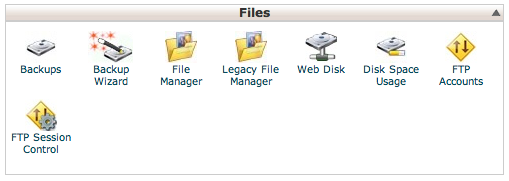
For those who only have user-level cpanel access, you will need to log into your cpanel account. From there under the file section you will see a Backup Wizard icon.
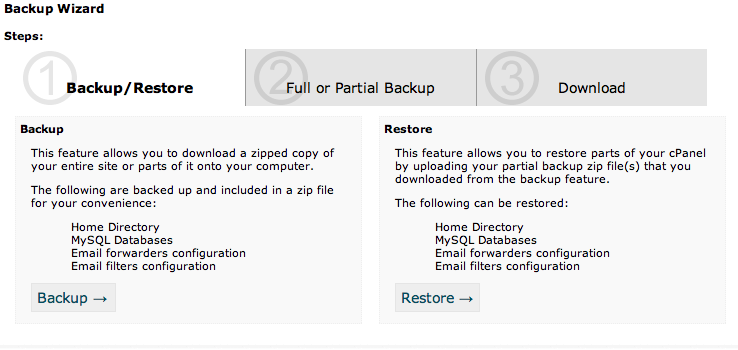
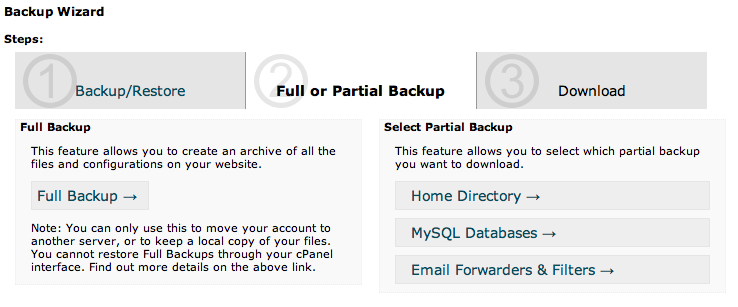
When you click on that, you'll be prompted to 1) Backup. 2) Full Backup 3) Provide email.
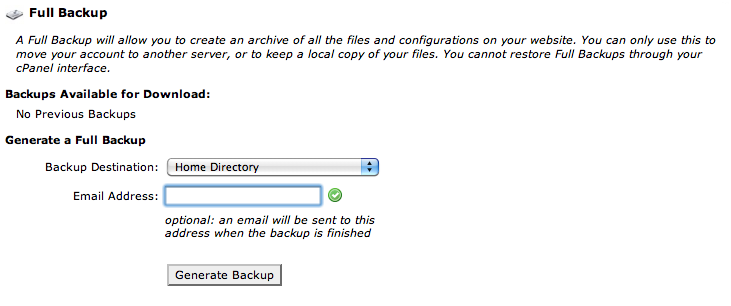
When the backup packaging is complete you will receive an email notification, and the generated file will be placed in your home directory. (usually the default root of your FTP client when you log in). You will want to download this .tar.gz file onto your desktop.